
Form Coupons
Form Coupons is one of the menus in NoBox used to create, manage, and configure coupons or promo codes that can be used in the system. This feature is very useful to support marketing strategies, increase sales conversion, and provide incentives to customers in the form of discounts or free shipping.
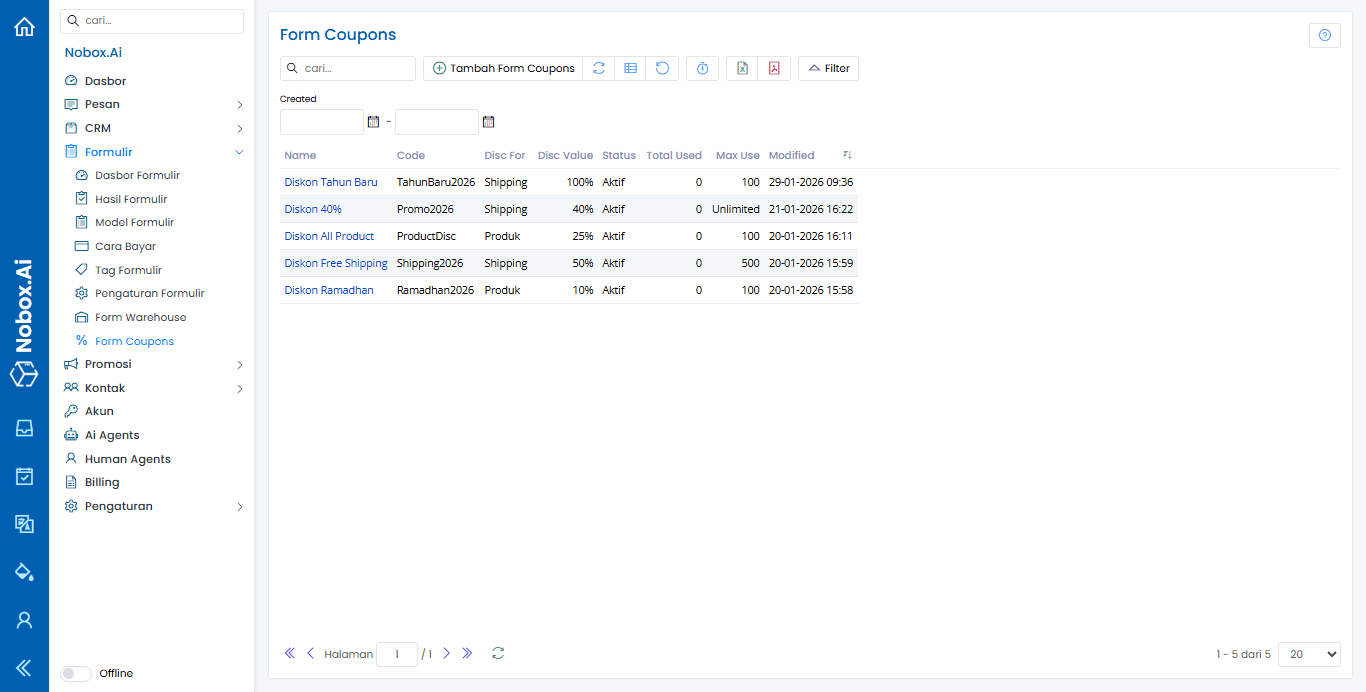
Add Coupons Formulir
To create a new coupon form model, click the menu [Form Coupons] ➔ [Add Form Coupons]. The [Add Form Coupons] dialog will appear.
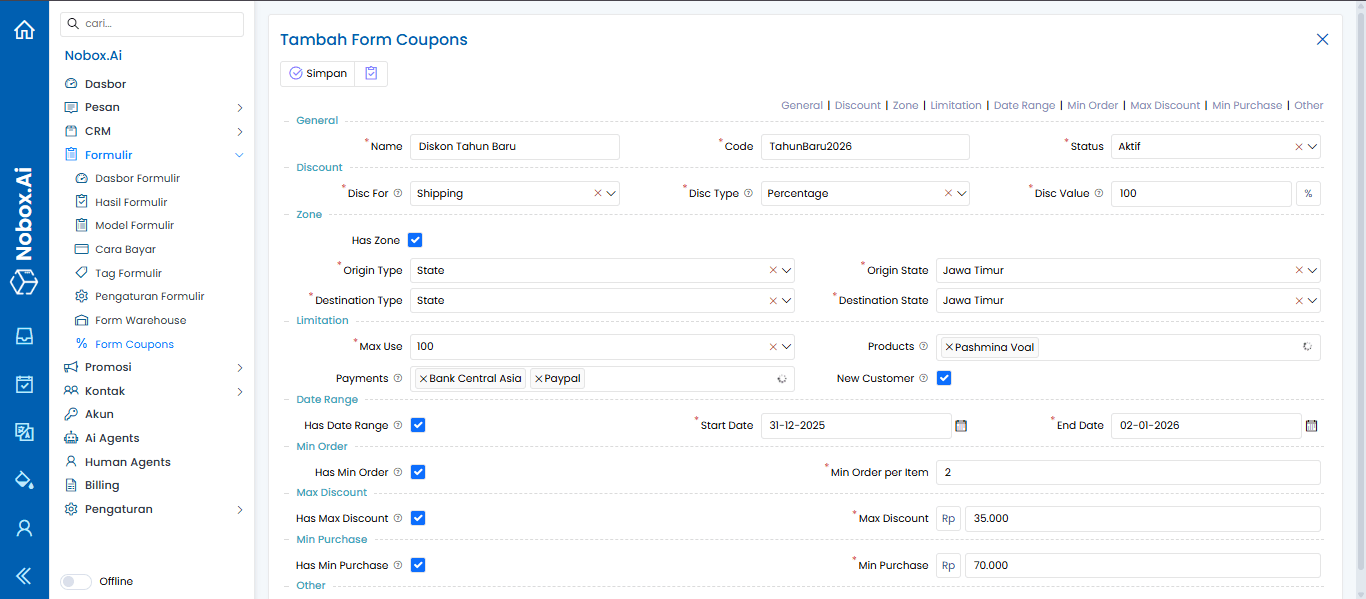
Complete the required fields, for example as follows:
| Field | Description | Example |
|---|---|---|
| Nama | Name of the coupon or promo that will be displayed in the system | Diskon Tahun Baru |
| Code | Coupon code entered by users during checkout | TahunBaru2026 |
| Status | Coupon status: active or inactive. If inactive, the coupon cannot be used | Aktif |
| Disc For | Determines whether the discount applies to products or shipping costs | Shipping |
| Disc Type | Discount type: fixed price (fixed amount) or percentage | Percentage |
| Disc Value | Discount value according to the selected discount type | 100% |
| Has Zone | Check if the coupon is only valid for certain zones | |
| Origin Type | Type of origin area if Has Zone is checked (Country, State, City) | State |
| Origin State | Origin province if Has Zone is checked | Jawa Timur |
| Destination Type | Type of destination area if Has Zone is checked | State |
| Destination State | Destination state if Has Zone is checked | Jawa Timur |
| Max Use | Maximum number of times the coupon can be used | 100 |
| Products | Specific products that can use this coupon | Pashmina Voal |
| Payments | Allowed payment methods for this coupon (Bank Central Asia, COD, PayPal) | Bank Central Asia, Paypal |
| New Customer | Check if the coupon is only for new customers | |
| Has Date Range | Check if the coupon has a usage time limit | Start date: 31-12-2025 End date: 02-01-2026 |
| Has Min Order | Check if the coupon requires a minimum number of items per order | 2 |
| Has Max Discount | Check if the coupon has a maximum discount amount | Rp35.000 |
| Has Min Purchase | Check if the coupon requires a minimum purchase amount | Rp70.000 |
After completing all required fields, click [Save] to store the newly created coupon form model.
Additional Explanation of Special Fields
-
Has Zone : If enabled, the coupon can only be used for transactions with specific shipping origins and destinations.
-
Has Date Range : If enabled, you can define the start date and end date of the coupon’s validity period.
-
Has Min Order : Used to define the minimum number of items in an order for the coupon to be applicable.
-
Has Max Discount : Used to limit the maximum discount amount that can be applied, even if the discount percentage is large.
-
Has Min Purchase : Used to define the minimum total purchase value required to use the coupon.
Saving Coupon Data
After all fields are completed according to the promo requirements, click the [Save] button to store the newly created coupon data. If there are required fields that are not filled in or the data format is incorrect, the system will display an error message to help you fix it.
Edit Coupons Form
To edit an existing coupon:
1. Select the coupon data you want to edit from the list.
2. Click the [Edit] button.
3. Make changes to the required fields.
4. Click [Save] to save the changes.
The changes you make will be applied immediately to the coupon and will affect subsequent transactions.rubahan yang Anda lakukan akan langsung diterapkan pada kupon tersebut dan memengaruhi transaksi berikutnya.
Delete Coupons Formulir
To delete a coupon:
1. Select the coupon data you want to delete.
2. Click the [Delete] button.
3. A delete confirmation dialog will appear.
4. Click [Yes] to proceed or [No] to cancel.
Deleted coupon data cannot be restored.
Tips for Using Form Coupons
-
Use coupon codes that are easy to remember and relevant to the promo campaign.
-
Always set a coupon validity period to avoid unlimited usage.
-
Use zone and product restrictions for more targeted promotions.
-
Use the Max Use feature to control the number of times a coupon can be used.
-
Enable Has Max Discount when using large percentage discounts to avoid losses.
By using Form Coupons optimally, you can manage promotions in a more structured, secure, and effective way according to your business needs.