Nobox LogoNobox.AI
Welcome To Nobox.AI

INTRODUCTION

OverviewNoBox.AI Interface

NEW USER GUIDE

RegistrationLoginNoBox Desktop InstallationNoBox Web InstallationCRM User Registration

MENU

Dashboard
AccountAI AgentHuman AgentSubscriptionBilling
User ProfileTenant ProfileUpdate ProfileChange PasswordCustom FieldsFile ManagerTool Contact

AUTOMATION

E-mailFeatureWhatsAppTelegramShopeeTokopediaBukalapak

EXTRACTOR

Indonesiayp.com Extractor

NOBOX DEKSTOP

Nobox Dekstop

AFFILIATE

Register AffiliateAffiliate ProgramStore Affiliate and How to Order

FIX A PROBLEM

Problem: User Can't LoginProblem: Can't Add New Account and ToolConfiguration Telegram APIForgot Password

POLICY AND SAFETY

SecurityComplianceIPR ComplaintsAnti-Spam PolicyTerms Of ServicePrivacy PolicyCookie PolicyGDPR ComplianceAbuse PolicyContact us
Nobox LogoNobox.AI
Settings

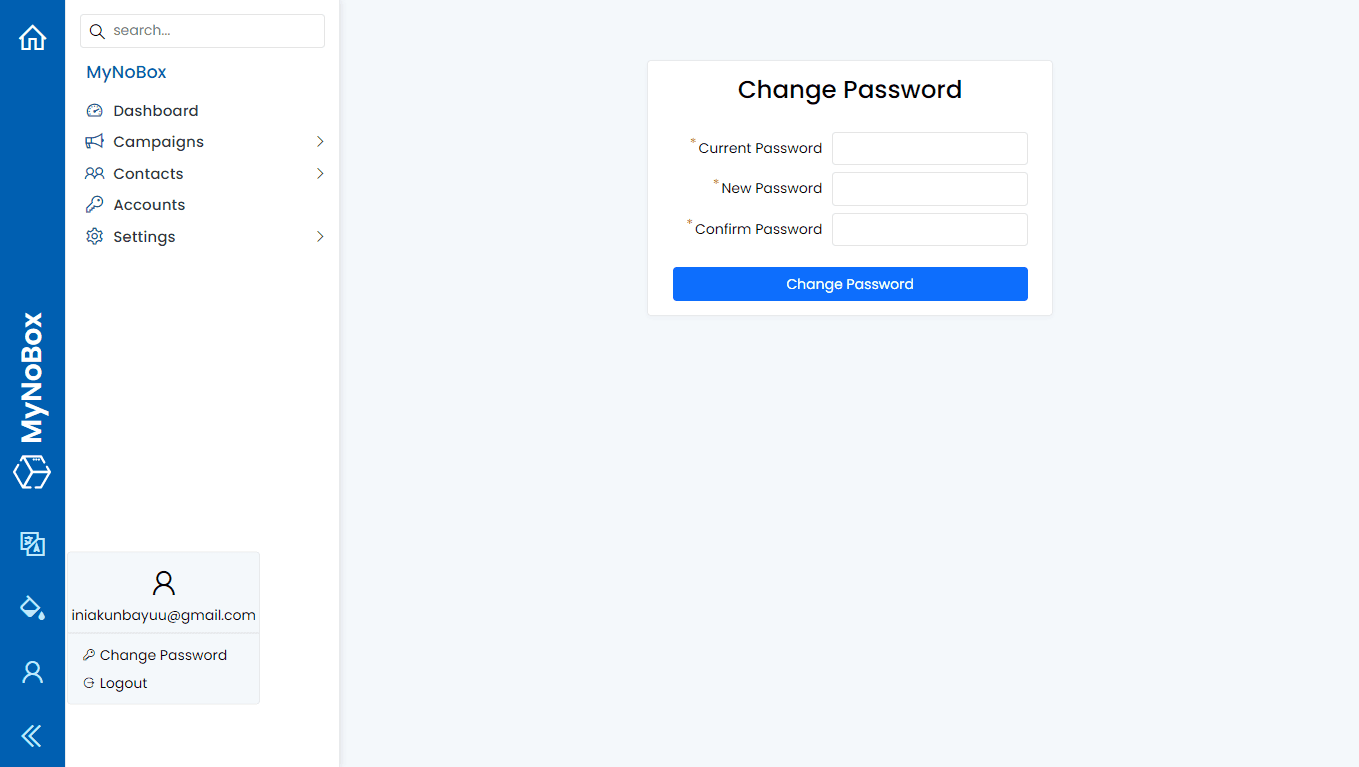
Change Password

  • Open id.nobox.ai
  • Log in with your account
  • In the sidebar, click [ User Icon ]
  • Klik [Change Password]
Change Password Settings
  • Fill out the form and click [Change Password].

If you have any issues or difficulties related to Nobox.Ai, please contact us through Support Ticket

Update Profile

Understanding the dashboard, kanban, list, and form structure in NoBox.AI

Custom Fields

Understanding the dashboard, kanban, list, and form structure in NoBox.AI